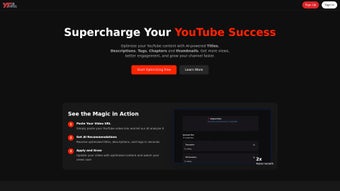

Download YTNinja – AI‑Powered YouTube Optimization Tool
Overview
YTNinja is a subscription‑based web application that brings the power of artificial intelligence to every step of the YouTube content creation process. Designed for creators who want to grow their channels faster, YTNinja automatically generates compelling video titles, SEO‑rich descriptions, targeted tags, chapter markers, and even eye‑catching thumbnails. By handling the repetitive and time‑consuming aspects of YouTube SEO, the platform lets creators focus on the core of their work – producing high‑quality videos that resonate with their audience.
The AI models behind YTNinja are trained on millions of successful YouTube videos, meaning the suggestions are data‑driven and constantly updated to reflect the latest algorithm changes. Whether you are a solo vlogger, a multi‑creator network, or a brand looking to expand its reach, YTNinja offers a single, secure dashboard where you can plan, optimize, and publish content with confidence. The tool’s promise is simple: increase views, boost engagement, and accelerate channel growth by making every video as discoverable as possible.
Feature Deep Dive
- AI‑Generated Title Engine: Produces click‑worthy titles based on keyword trends, audience sentiment, and video context.
- Dynamic Description Builder: Crafts 150‑character to 5,000‑character descriptions that include relevant hashtags, timestamps, and calls‑to‑action.
- Smart Tag Suggestion: Generates up to 30 optimized tags that improve discoverability while avoiding over‑stuffing penalties.
- Automatic Chapter Markers: Analyzes video transcripts to insert logical chapter breaks, enhancing watch‑time and user experience.
- Thumbnail Generator: Uses AI to design high‑contrast, brand‑consistent thumbnails in seconds, with customizable text overlays.
- Bulk Optimization Mode: Allows creators to upload CSV files of multiple videos for batch processing, saving hours of manual work.
- Performance Dashboard: Tracks keyword rankings, CTR, average view duration, and subscriber growth after each upload.
- One‑Click Export: Directly copies titles, descriptions, tags, and thumbnails into YouTube’s upload interface or saves them as .txt/.png files.
- Secure Cloud Storage: All generated assets are stored encrypted on GDPR‑compliant servers, ensuring privacy and data integrity.
- Regular AI Model Updates: The platform receives monthly algorithm‑aware updates, keeping suggestions aligned with YouTube’s evolving ranking factors.
Each feature is built with a user‑first mindset. For example, the Thumbnail Generator offers preset styles for gaming, education, lifestyle, and tech niches, so creators can maintain a consistent visual brand without hiring a designer. The Bulk Optimization Mode is especially valuable for agencies that manage dozens of channels, allowing them to run a single optimization run for an entire content calendar. Moreover, the Performance Dashboard not only displays raw metrics but also visualizes trends, giving creators actionable insights about which keywords are driving the most organic traffic. Together, these capabilities make YTNinja a comprehensive, end‑to‑end solution for anyone serious about YouTube growth.
Installation, Usage & Compatibility
YTNinja is a cloud‑based service, which means there is no traditional installation required on your computer. Getting started is as simple as creating an account, selecting a subscription plan, and logging into the web dashboard from any modern browser. The platform supports Windows 10/11, macOS Catalina and later, as well as Linux distributions that run Chrome, Edge, or Firefox. Because the service is web‑native, it works equally well on Android and iOS tablets via responsive design, though the full feature set (especially bulk processing) is optimized for desktop environments.
Step‑by‑Step Setup
- Visit YTNinja.com and click “Start Free Trial”.
- Enter your email, create a strong password, and verify your account through the confirmation link.
- Choose a subscription tier – Starter (single channel), Pro (up to 5 channels), or Agency (unlimited).
- Connect your YouTube channel via OAuth; YTNinja only requests read‑only permissions for analytics and upload access.
- Navigate to the “New Project” tab, paste your video URL or upload the raw file, and let the AI analyze the content.
- Select the elements you want to generate (title, description, tags, chapters, thumbnail) and click “Generate”.
- Review the suggestions, make any manual tweaks, then copy the output directly into YouTube’s upload form or download the assets.
- After publishing, return to the “Performance Dashboard” after 24‑48 hours to see real‑time impact on views and engagement.
The user interface follows a clean, modular layout. The left sidebar houses navigation, while the central workspace displays live AI suggestions with confidence scores. For creators who prefer a more hands‑off approach, the “Auto‑Publish” toggle can be enabled, allowing YTNinja to schedule uploads with the generated metadata at pre‑defined times. All data exchanges are encrypted with HTTPS, and the platform adheres to YouTube’s API usage policies, guaranteeing a secure and compliant workflow.
Supported Operating Systems: Windows, macOS, Linux (desktop browsers); Android & iOS (mobile browsers). No additional software or plugins are required.
Pros, Cons, FAQ & Conclusion
Pros & Cons
- Pros:
- AI‑driven suggestions are based on up‑to‑date YouTube data, leading to higher click‑through rates.
- All‑in‑one platform eliminates the need for multiple SEO tools.
- Bulk optimization saves time for agencies and multi‑channel managers.
- Secure cloud storage keeps generated assets safe and accessible.
- Responsive design works on both desktop and mobile browsers.
- Cons:
- Subscription cost may be prohibitive for hobbyist creators on a very tight budget.
- Full feature set (bulk mode, performance dashboard) is only available on higher‑tier plans.
- Because it’s web‑based, you need a stable internet connection to generate assets.
Review Summary: YTNinja delivers a robust AI‑powered workflow that dramatically cuts down the time spent on YouTube SEO. Its comprehensive feature set, especially the thumbnail generator and bulk optimizer, makes it a standout tool for serious creators. While the price point could be a barrier for newcomers, the measurable boost in views and engagement justifies the investment for growing channels.
Frequently Asked Questions
Can YTNinja be used with multiple YouTube channels?
Yes. The Pro plan supports up to five channels, and the Agency plan offers unlimited channel connections. You can switch between channels directly from the dashboard.
Does YTNinja store my video files?
No. YTNinja only processes the video temporarily to generate metadata and then discards the file. Only the generated text and thumbnail assets are stored securely.
How often are the AI models updated?
The platform receives monthly updates that incorporate the latest YouTube algorithm changes and keyword trends, ensuring recommendations stay relevant.
Is there a free trial or a free tier?
YTNinja offers a 7‑day free trial with full access to all features. After the trial, you can choose a paid plan or cancel without charge.
Can I export the generated thumbnails in different sizes?
Yes. The thumbnail generator lets you download assets in the standard 1280×720 px size as well as custom dimensions for other platforms.
Conclusion & Call to Action
If you’re serious about scaling your YouTube presence, YTNinja provides a powerful, AI‑backed solution that turns SEO chores into a few clicks. The combination of title generation, description crafting, tag optimization, chapter creation, and thumbnail design equips creators with a complete toolkit for maximizing visibility. While the subscription cost reflects the premium nature of the service, the measurable uplift in views, watch time, and subscriber growth often pays for itself within weeks of regular use. Ready to give your channel the edge it deserves? Start your free trial today and watch your videos climb the rankings faster than ever.






